![ys_emblem_background_dorian_RGB.png]](https://helpcenter.yellowscan.com/hs-fs/hubfs/ys_emblem_background_dorian_RGB.png?height=40&name=ys_emblem_background_dorian_RGB.png)
There are several explanations to this issue.
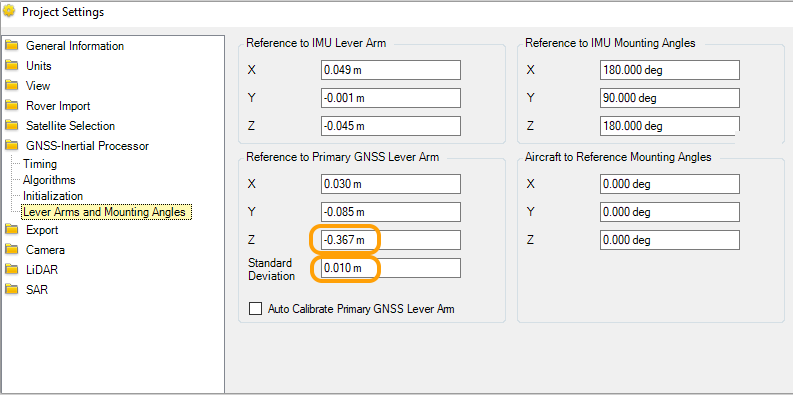
- in POSPac, check the Z lever arm values, but also that they locked the lever arms at processing
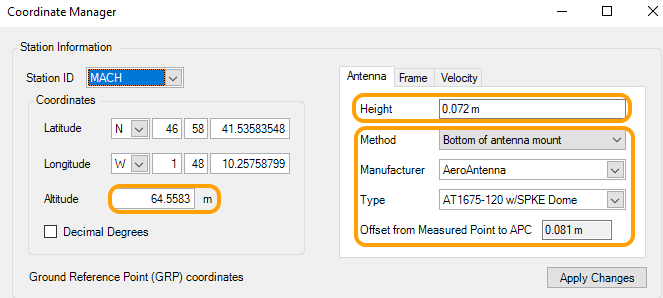
- in POSPac, in Coordinates Manager : check the base station coordinates (that they are identical to the ones used for RTK), check the Antenna height, check that reference point is ARP or APC
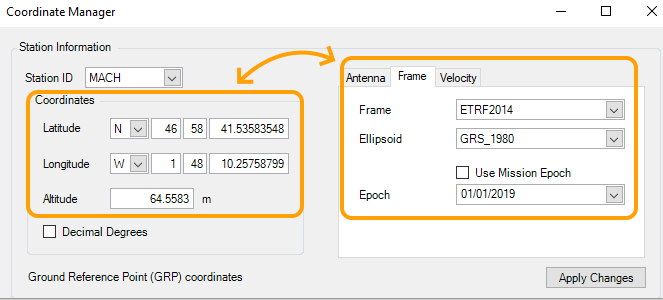
- in POSPac, in COordinates Manager, check that the reference frame and epoch used match the coordinates provided
- in POSPac , Project Settings, Export, Settings, check that the reference frame used and epoch used match the GCP reference frame/epoch of measurement
- in POSPac, Project Settings, Export, Settings , check that the geoid model in used is the right one, or if ellipsoidal height should be used.

- Also, please note that a changing Z offset could also be the indication of a XY shift.